Raspberry Pi Pico W Breadboard Pin-Out ID Tags
Every now and then, I get asked how a guy who is visually disabled works with Microprocessor boards, parts, etc. I could say “carefully”. But honestly, it was getting more difficult everyday. Being stubborn, I found “workarounds” that worked for a long time. My problem was thinking I needed to solve everything on my own, or I wouldn’t be in control.
Then, one day, after messing up again, I came to the realization that if I wanted to keep doing this, I needed help (from either tech and tools or the wife). Well, I didn’t want to walk away from something that gave me so much fun, so I decided that asking for help and doing things a different way was OK.
Here is how I solved one of my issues –
The problem: reading pin out numbers on Development Boards.
One of the problems I’ve had is being able to read the pin numbers on development boards. Although most of this issue is probably the visually disabled thing, I swear as I get older they are making the damn numbers smaller!

The solution:
I, of course, use lots of magnification, but also, with the help of the wife, (who is also a publisher and designer) we made up some “tags” for me to stick to my breadboards.
NOTE: You are completely responsible, for the use or misuse of this information. If you stick them down wrong and plug things in wrong and it blows up that’s your problem, neither I nor my company, nor my family, will be held responsible for any damage. You have been warned.
Here is a shot of what it looks like without the wires.
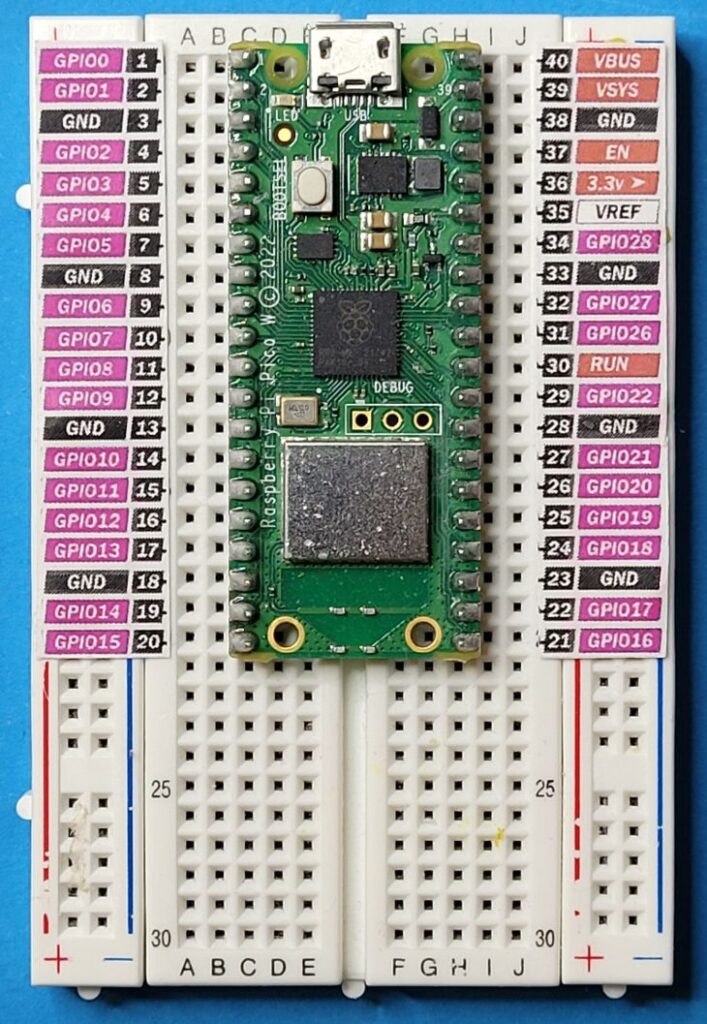
As you can see even on this 400 tie point breadboard, there is still some room for a sensor or relay for testing. So for prototyping they can come in very handy.
Of course, this information would be even more helpful if I was to include the actual tag printout…
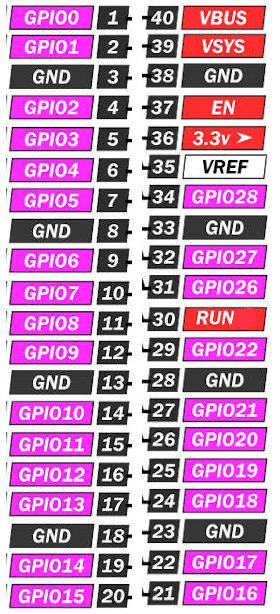
well here it is; simply download the png file and print it to the exact size you need. I’ve found that if printed to a height of 5.1cm (total), they cut to about the right size.
I use tiny balls of blue tack in several places along the strip of paper, to gently hold them to the wide flat spaces on the power stripe of the breadboards. That way no blue tack gets into the holes in the breadboard.
This solution has really helped me save time and errors and having to call on the wife’s eyes.
You can also use this idea for other boards such as the esp32, esp8266,etc.
Cheer’ Al (alsnersnotes.com)
© Al’s Nerd Notes